Thursday, July 23, 20264 min read
How to Add Technicians to workauto

A garage diary only pays off if the people doing the work can see it. If you're the only login, you're still the only one who knows what's going on and every "where are we with the Civic?" ends up back at your desk.
That's why setting up technician logins is one of the most valuable steps you can take after getting your diary live. Garages that add their technicians to their garage software see the biggest difference, not because the software changes, but because the information stops bottlenecking through one person.
What Changes When Your Techs Have Their Own Login
Right now, you might be the only one looking at the planner. Everything, job status, what's next, what's finished, runs through you, because you're the only one who can see it.
Add technicians, and that changes. Each tech gets their own account and their own view of the jobs assigned to them. No shared password, no looking over your shoulder, no shouting across the workshop to find out what stage a job's at.
For garages with two or three bays, this might sound like a small change. In practice, it's the difference between a diary the owner maintains and a diary the whole team runs from.
What Your Technicians See
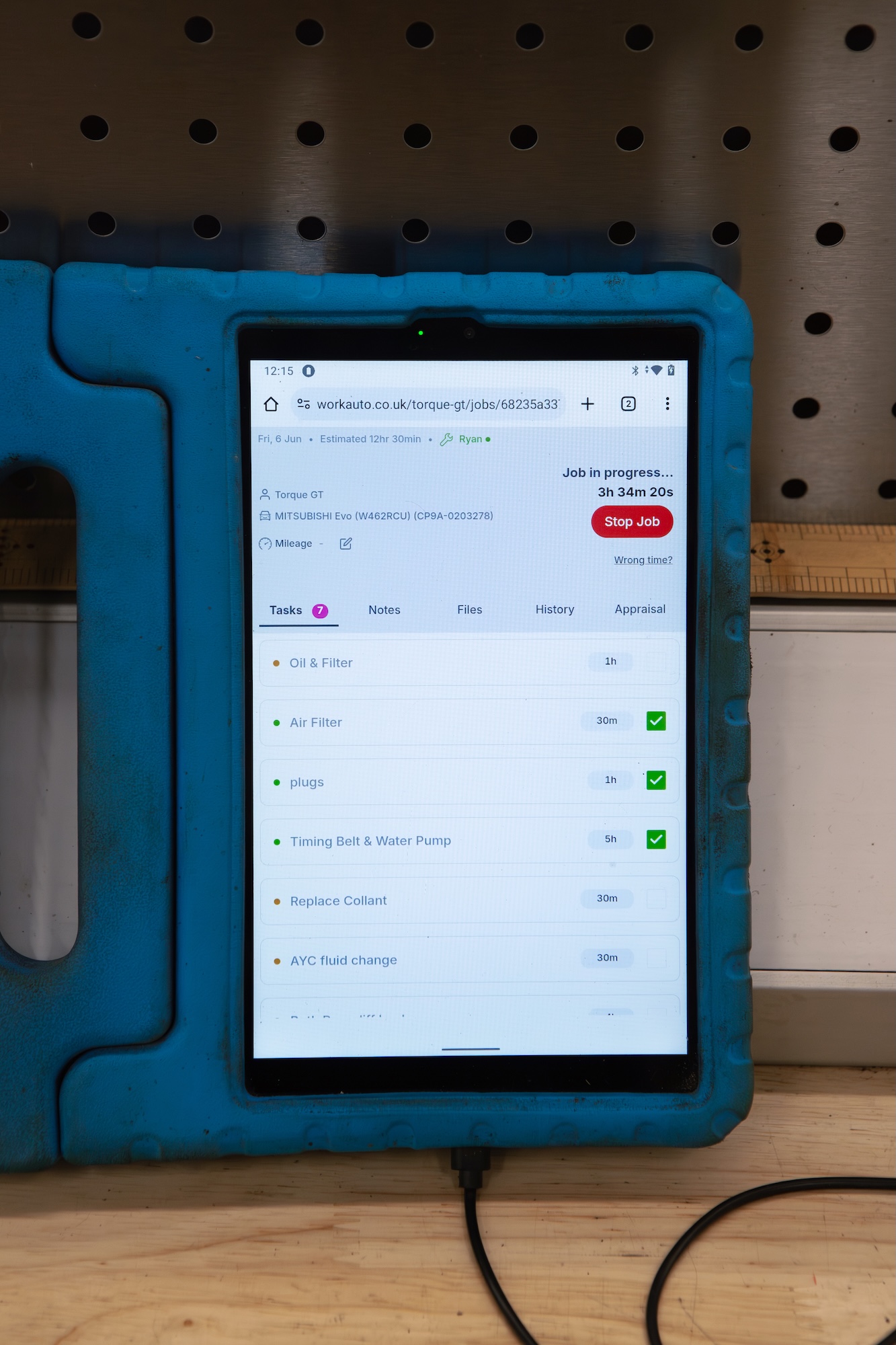
A technician's login is built around their day, not yours:
Their assigned jobs - what's booked in for them, and what order to work through it.
Job details and history - the vehicle, the customer, what's already been noted, without tracking you down to ask.
Status updates they can make themselves - moving a job from "in progress" to "complete" as they go, so the diary reflects the workshop floor in real time.
There's nothing extra to configure. A technician's login shows only what's relevant to them, no admin settings, no other techs' jobs, no clutter.
Why Technician Logins Actually Matter
The value isn't the login itself, it's what stops happening once every technician has one:
No more "where are we with the Civic?" The status is already on the planner. Anyone can look, including you, without walking over to ask.
Fewer interruptions on the workshop floor. Technicians update their own jobs instead of relaying progress verbally, job by job, all day.
A diary that reflects reality. If the office view and the workshop floor show two different pictures, the diary isn't doing its job. One login per technician fixes that gap.
Faster handovers. If a job carries over to the next shift or the next day, the notes and status are already there, nothing gets lost between conversations.
One Login, One Source of Truth
You don't need to change how your technicians work to get this benefit. They already know which jobs are theirs and what state each one's in, adding them to your garage software just gives them somewhere to put that, so it's visible to everyone.
This is also why multi-user garages tend to get more out of Workauto than single-login accounts. The planner only reflects what people actually put into it. The more of your team that are logging status updates, the more accurate and useful the planner becomes.
FAQs
Do technicians need training to use Workauto? No. It's very simple and intuitive. Load the jobs and
Does adding a technician cost extra? No, it's all in with the standard plan.
What happens if a technician updates a job status? It updates the planner in real time, so anyone else with access sees the change immediately. It also sends an update notification to the officeview.
Ready to get your workshop working from one diary? Start your free trial and see your workshop's status without leaving your desk.